




✦ Your Windows desktop reading companion

Read it aloud.
Make sense
of it together.

For the passage you want to hear, not reread.
Highlight selectable text in your browser or document, and let Cappypanda read it beside you.

We’ll email you the download link—open it on your Windows PC.

Basic reads locally, without an app account.
Optional AI explanations and Bro&Bestie: $29 once.

✦✧

YOUR NEXT CHAPTER
HAS COMPANY.

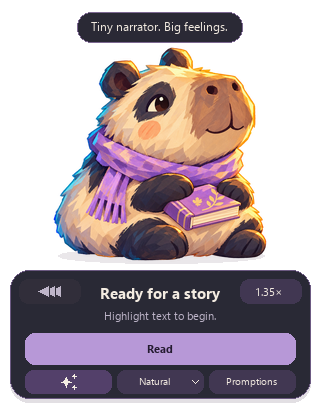
Cappypanda, a chibi capybara-panda with a lavender scarf, waving over an open book
“Let’s make
sense of it together.
A little clarity, read aloud
LOCAL READING · YOUR TEXT STAYS ON YOUR PCRead it. Hear it. Get it.SCROLL TO EXPLORE

01 / THREE WAYS TO LISTEN

Same words.
A fresh perspective.

For the article you saved. The paragraph you read twice.
The idea you’d love someone to talk through.

THE WORDS YOU FOUND01—03

You do not have to understand a whole idea at once. Start with one small part, connect it to something you already know, and let the bigger picture take shape.

Highlight a passage + Cappypanda

In the app, highlight text where you’re reading, then ask Cappypanda to read or explain it.

A FAMILIAR VOICE

Just let it read.

Listen to the sample
0:000:00

Cappy reads · Bro (George) & Bestie (Mary) talk it through

Voice credits and sample details · Authored examples, rendered locally. Explain and Bro&Bestie require the AI-enabled edition and local AI setup.

01

Keep your place.

A desktop reader for selectable text in the apps you use.

02

Choose your way in.

Read the original with Basic. Add explanations and thoughtful conversations with AI-enabled.

03

Make room to listen.

Set the pace. Follow the captions. Let your companion keep you company.

ON YOUR DESKTOP

Highlight a thought.
Let Cappy read.

  1. Select a short passageStart with selectable text in a web page or document. Scanned images need text recognition first.
  2. Choose ReadUse your companion’s Read button, or press Ctrl + Shift + F9.
  3. Settle in and listenAdjust the speed and follow word captions. While reading, the companion’s Read button becomes Stop—choose it whenever you want to finish. The voice may take a few seconds to begin.
Follow the illustrated setup guide →
Cappypanda’s actual desktop controls, including Read and Promptions
App screenshot · Your everyday reading controls.
Choose Read for everyday listening, or Promptions for AI reading modes.

THE ORIGINAL CAST / 01

Original Cappypanda with a lavender scarf and book
The originalYour everyday reading companion

02 / A NOOK THAT FEELS LIKE YOU

A little character.
A lot of you.

Your desktop has room for personality.
Meet Cappypanda and the cast that brings your reading to life.

03 / YOUR OWN WAY WITH WORDS

Keep your favorites
close at hand.

“Give me the gist.” “Make it a dialogue.”
Save the ways you like to turn text into something you can listen to.

The AI-enabled edition includes three reusable prompt spaces. Rename or replace a favorite whenever you want.

YOUR PROMPT SPACES3 reusable spaces

Try editing a space. This preview stays in this page only.

04 / FIND YOUR READING RHYTHM

Start free.
Add AI once.

Enjoy local reading with Basic. Choose AI-enabled for more ways to understand a passage.

Available for Windows · Basic introductory offer and AI-enabled

A SIMPLE PLACE TO START

Basic

$0 introductory offer

A little company for your everyday reading.

  • Highlight and read aloud
  • Unlimited on-device reading
  • Speed controls and word captions
  • No account for local reading
Get Basic free

We’ll email you the download link—open it on your Windows PC.

Planned price: $11. Get Basic during the introductory offer and keep your Basic access free.

Prices in USD, before applicable tax. The Windows installer is about 1.09 GB and is currently unsigned. Installation details →

A FEW THINGS TO KNOW

Small companion.
Clear answers.

Can I use it without an AI account?

Yes. Basic reading works locally without an account. AI-enabled also runs locally after setup and license activation, with no paid AI subscription. AI requirements & setup →

Are my three prompt spaces permanent?

The AI-enabled edition has three favorites ready at once. The spaces are reusable: rename one, paste in another prompt, or change its instructions whenever you want.

Does my text leave my computer?

Local speech runs on your computer. In this Windows release, Offline AI also processes your text on your computer. Future cloud features, if offered, would need their own disclosures. The website samples are already prepared and don’t send text to an AI provider.

Can I make skins for the marketplace?

That is the plan: a place for artists to create character artwork for Cappypanda’s different states. Creator submissions, terms and publishing tools are still in development.

Can I download Cappypanda today?

Yes. Basic is free during the introductory period, with optional support. AI-enabled is $29 once and includes Basic. Download and follow the visual installation guide → The cloud speech subscription and skin marketplace are still in development.

✦

Your next big idea
could use a little company.

Get Basic free for Windows

We’ll email you the download link—open it on your Windows PC.

A little good company, whenever you want to listen.

Made by Miguel David, for curious minds that like to listen.
Optional support helps our family and ongoing development. Meet the maker & contact details →

Edit your prompt space

A local preview. Nothing is sent to an AI service.

YOUR FREE COPY

A little support. Always optional.

Basic stays free during our introductory period. Your optional support helps our family and ongoing development.

Continue free →

We’ll email you the download link—open it on your Windows PC.

YOURS TO ENJOY

Basic · introductory offer

Make yourself at home.

$0no payment
Basic reading is included.

Highlight, listen, and enjoy.